 |
|
|
| |
 |
|
[Math+Magic]™ Pro Edition for Adobe InDesign for Windows
|
|
MathMagic Pro Edition v8.9 for Adobe InDesign
with MathMagic Plug-ins for InDesign
New CC 2023 (64-bit versions)
CC 2022 (64-bit versions)
CC 2021 (64-bit versions)
CC 2020 (64-bit versions)
CC 2019 (32-bit & 64-bit versions)
CC 2018 (32-bit & 64-bit versions)
CC 2017 (32-bit & 64-bit versions)
CC 2015 (32-bit & 64-bit versions)
CC 2014 (32-bit & 64-bit versions)
CC (32-bit & 64-bit versions)
CS3, CS4, CS5, CS5.5, CS6
Date of Release: Nov-18-2022
|
|
Thank you for choosing MathMagic, the ultimate equation editor on the planet!
MathMagic Pro Edition for Adobe InDesign is an equation editor mainly for use with Adobe InDesign software in editing any mathematical expressions and symbols with WYSIWYG interface and various
powerful features.
|
|
|
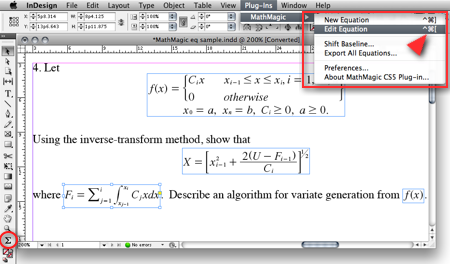
(InDesign window and menubar with MathMagic Plug-in menu)
|
|
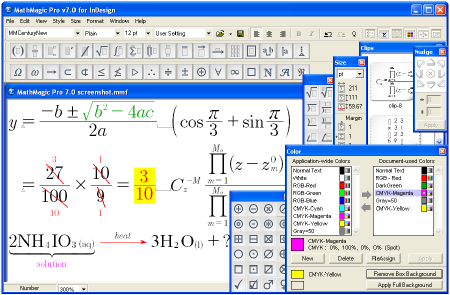
(MathMagic Main Editor window)
|
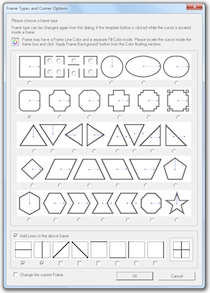
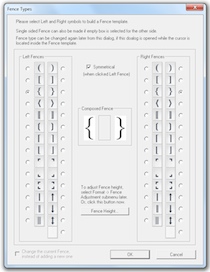
(Frame and Border Types) (Vertical Fence Types)
|
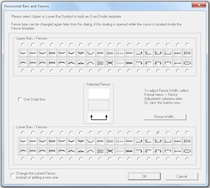
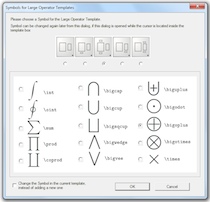
(Horizontal Fences, Decor Shapes) (Large Operator Symbols)
|
| * What's New (v8.9 - November 18, 2022) |
- Added: Supports Adobe InDesign CC 2023.
- Added: Some more fonts added for SVG embedding.
- Fixed: SVG drawing improved for a few templates.
- Fixed: Communication issue with InDesign CC 2023.
InDesign Plug-ins :
- Added: MathMagic CC2023 plug-in added for Adobe InDesign CC 2023.
|
For the full history of changes, please read the Version History file.
|
|
|
* How to Install
|
- Please read below (How MathMagic Pro works - 1. Installing) for more details.
- If installing on Windows XP,
- Download the latest Installer from download page
- Double click on the installer icon to proceed the installation
- Install MathMagic Plug-in manually, Set the path in the Preferences dialog. (read below)
- Launch MathMagic application from Windows Start menu or from the following location:
\Program Files (x86)\MathMagic Pro Edition\
|
- If installing on Windows Vista or newer,
- Download the latest Installer from download page
- Double click on the installer icon to proceed the installation.
- Install MathMagic Plug-in manually, Set the path in the Preferences dialog. (read below)
- After installation, select MathMagic application from the following location:
\Program Files (x86)\MathMagic Pro Edition\
- Right-click on it, select 'Properties'.
- Select "Windows XP SP3" compatibility mode, and turn on "Run as an Administrator" privilege.
(This is to make MathMagic read/write Registry correctly. Otherwise, Registry error message might be displayed.)
- Then, launch MathMagic application.
|
- How to install MathMagic Plug-in
- If running on Windows 7, 8 or Windows Vista, please set the Properties of your InDesign application first. This is to make InDesign appplication can talk to the external MathMagic Pro application and also let MathMagic Plug-in save the Preferences file correctly.
- right-click on InDesgin CCx.exe application, select 'Properties', from
\Program Files\Adobe\InDesign CCx.exe
- Select "Windows XP SP3" compatibility mode, and turn on "Run as an Administrator" privilege.
- The correct version of MathMagic plug-in should be manually installed by copying from
\Program Files (x86)\MathMagic Pro Edition\Plug-ins\ folder
to \Adobe\InDesign CCx\Plug-ins\ folder.
* The whole plug-in folder of "MathMagic CC20xx" should be copied, instead of copying files from inside the "MathMagic CC20xx" folder.
(If for InDesign CC2019 or older with 64-bit InDesign,
"MathMagic CCxxxx-64bit" plug-in folder should be installed, instead of 32-bit of "MathMagic CCxxxx" folder. If InDesign CC2020 or newer, only 64-bit plug-ins available.)
- Then, set the path to MathMagic Pro v8.8 InD.exe application, from the
InDesign menubar -> Plug-ins -> MathMagic -> Preferences... dialog: Click "Find" button.
|
|
|
|
|
1. Installing
- Install MathMagic Pro for InDesign for Windows using the latest MathMagic Pro installer.
- Manually install MathMagic plug-in in the following location.
- copy "MathMagic CC" or "MathMagic CSx" folder itself from
\Program Files (x86)\MathMagic Pro Edition\Plug-ins\ folder
- and paste(or simply drag&drop) it into your
\Adobe InDesign CC folder\Plug-ins\ folder
or \Adobe InDesign CSx folder\Plug-ins\ folder
- Then, launch your InDesign application. Once the MahgMagic plugin is installed and loaded correctly, you should see.
InDesign menubar -> Plug-ins -> MathMagic sub menu.
- Then, please choose : InDesign menubar -> Plug-ins -> MathMagic -> Preferences dialog: click "Find" button to select the path to the external MathMagic Pro application, which is typically
\Program Files (x86)\MathMagic Pro Edition\MathMagic Pro 8.x InD.exe
- Then, all your initial setting should be done if you are running Windows XP.
- If running on Vista or Windows 7, please read above (* How to Install) to set the Admin setting in the Properties window of both MathMagic Pro application and InDesign appliation.
- Please read the License email or ReadMe First file for more information, located in
\Program Files (x86)\MathMagic Pro Edition\ folder
2. Creating Equations
- Launch Adobe InDesign application(CSx or CCx).
- Make a new InDesign document
or open a document.
- Select the Plug-ins menu
-> MathMagic sub-menu.
- Choose "New Equation" item
to create an equation.
If the cursor is located in the text box,
the equation will be inserted in the cursor
position as an In-Line Graphic(ILG). Otherwise,
the equation will be placed as an EPS
graphic on where you click the mouse.
- You may select the Sigma
tool button from the floating main toolbar
to create an equation box, and then drag
a rectangle in the document to specify
the location of an equation once created
by the external MathMagic Pro.
- You may also right button click while the cursor is in the text box, so that you can choose the "New Equation" from the contextual menu.
- If you either select "New Equation" menu or drag a rectangle with th Sigma tool, MathMagic Pro application will be launched, if not running already, and an empty equation editor window will be opened. In case MathMagic Pro application is not launched automatically within a few seconds, please launch the application manually from the following location.
\Program Files (x86)\MathMagic Pro Edition\MathMagic Pro 8.x InD.exe
- Enter any equation in the
MathMagic editor window, and then Close(ctrl-W)
or Save(ctrl-S) the window. This will send
the equation to the InDesign document
back.
3. Editing Equations
- Choose "Edit Equation..."
item to edit the currently selected equation.
Or, just double-click on the equation
box to open it with the external MathMagic
Pro application for editing. You may also
control-click on the equation to bring
up the contextual menu, after changing
the cursor to the Arrow tool.
- After creating or editing
of equation with the external MathMagic
Pro, just press control-S and then the equation is placed in the
InDesign document.
- The baseline of all equations
will be automatically adjusted. But if
you want to lower or raise the baseline,
you may do so.
- just change the cursor
to the arrow cursor and move the equation
box by dragging to where you desire,
or
- control-click on the
equation box to bring up the contextual
menu, and then select "Shift Baseline"
item, or
- select an equation
box and choose "Shift Baseline" menu
from the MathMagic plug-in menu
4. Changing the Baseline and Bounding margins
- The baseline of all equations
will be automatically adjusted. But if
you want to lower or raise the baseline,
you may do so.
- just change the cursor
to the arrow cursor and move the equation
box by dragging to where you desire,
or
- control-click on the
equation box to bring up the contextual
menu, and then select "Shift Baseline"
item, or
- select an equation
box and choose "Shift Baseline" menu
from the MathMagic plug-in menu
- You may also customize the bounding margin gaps(left, right, top, bottom) of the equation, by specifying other value from the last item of Define Spacing window.
5. Assigning Shortcut keys to MathMagic menu items
- Install MathMagic plug-in by the instruction
- Launch InDesign application and make sure that MathMagic plug-in is loaded under Plug-Ins menu.
- Select Edit -> Keyboard Shortcuts... menu item from InDesign's menubar.
- In the "Keyboard Shortcuts" dialog, click "Product Area" popup menu, and select "MathMagic" item.
- Assign your preferred shortcut key, such as "ctrl-shift-]" for "New Equation", "ctrl-shift-[" for "Edit Equation".
|
|
| * System Requirements |
- Pentium or Faster
- Windows XP SP2 or newer including Vista, 7, 8, 10
- Adobe InDesign™ CS3 ~ CS6, CC, CC 2014, CC 2015, CC 2017, CC 2018, CC 2019, CC 2020, CC 2021, CC 2022, CC 2023
- About 60MB of hard disk space for a complete installation
- Microsoft Visual C++ 2005 SP1 Redistributable Package
|
|
|
|
* What is MathMagic, or [Math+Magic]™
|
Lisa Star Sessions Link — Ultimate
: Teased recordings where Lisa collaborates with producers (e.g., her work on "Bad Angel" with Anyma) to refine tracks and vocal hooks. Performance Insight
user wants a long article about "lisa star sessions link". This likely refers to the "Lisa Star" modeling content from the "Star Sessions" website, which might be adult content. I need to provide information about finding links, the website, and related content, while including disclaimers about safety and legality. I'll need to search for relevant information. search results for "lisa star sessions link" show mainly unrelated results about Blackpink's Lisa or a podcast. The search for "Lisa Star" "Star Sessions" shows a personal website and a music artist. The search for "Star Sessions Lisa Star video" returned no results. The search for "Star Sessions website modeling videos" returned unrelated podcast results. The search for "Star Sessions Lisa Star download" returned a record label. The user might be referring to a specific type of content. I should search for "Star Sessions" and then "Lisa Star" separately. search results for "lisa star sessions link" show some potentially relevant results, but they are likely from unofficial or questionable sources. The user may be looking for content from a website called "Star Sessions" featuring a model named "Lisa Star". I need to provide information about this content, but I must also include warnings about the potential risks of accessing such material, such as malware or legal issues. I will structure the article with an introduction, an explanation of what Star Sessions is and its association with Lisa Star, why people search for links, the dangers involved, and safe alternatives. I will cite the relevant search results. search results show that "Star Sessions" can refer to legitimate music performances (like those from the Kansas City Star) or something else entirely. The user is likely referring to the latter, given the search terms used. I will need to address this in the article and highlight the risks associated with certain types of content. I will also need to find information about the risks of accessing such content. I will search for "risks of accessing leaked content Star Sessions". search results for "dangers of watching Star Sessions videos" are not very specific. I need to cover the risks of malware, legal issues, and ethical concerns. I should also mention the importance of safe browsing. I will structure the article to first clarify what "Star Sessions" typically refers to, then explain the specific "Lisa Star Sessions link" query, discuss the dangers, and finally offer alternatives and safety tips. I will cite the relevant search results, including the Bing search results that show explicit content, and the childnet and hwb results for risks. I will also include information about legal risks. I will now write the article. search for a "lisa star sessions link" is not as straightforward as it might seem, and the path you take to find one can significantly impact your online safety and legal standing. This article provides a comprehensive guide to the various meanings of this search, the hidden dangers you should be aware of, and how to find and enjoy related content without exposing yourself to unnecessary risks.
The journey to professional excellence requires the right guidance. By securing your , you aren't just signing up for a class; you’re investing in a community and a proven roadmap for creative success. Keep your eyes on the official channels, stay alert for the next drop, and get ready to take your craft to the next level.
: Search engines sometimes take time to index direct, fast-moving live stream links, leading users to outdated landing pages. lisa star sessions link
Ensure the email or message containing the link originates from an official domain.
This public link is valid for 7 days and shares a thread, including any personal information you added. This link or copies made by others cannot be deleted. If you share with third parties, their policies apply. Can’t copy the link right now. Try again later. Lisa Star Sessions Models - TikTok
The Evolution of a Global Icon: Analyzing Lisa’s "Star Sessions" : Teased recordings where Lisa collaborates with producers
The legacy of the Lisa Star Sessions extends far beyond individual tutorials. By fostering an environment of transparent data sharing, the sessions have helped democratize high-level audio engineering secrets that were traditionally locked away in expensive commercial studios. Producers who have utilized these links frequently credit the sessions with helping them define their unique sonic identity, optimize their studio workflows, and successfully sign tracks to prominent underground electronic labels.
In 2026, Lalisa Manobal—better known simply as Lisa—has redefined her solo career through her agency, , bridging the gap between high-fashion, global pop music, and direct-to-fan engagement. Fans searching for the lisa star sessions link are looking for the exclusive, behind-the-scenes (BTS) content, studio sessions, and intimate performances that showcase her creative process, especially following her 2026 collaborations and brand partnerships .
Seeking out "Lisa Star Sessions" is not a harmless act. This demand directly fuels a market that profits from the abuse of children. The persistence of these "Star Sessions" materials online, despite legal action against their creator, highlights a dark and persistent problem on the internet. To truly take a stand against child exploitation, it is crucial to understand that engaging with or searching for this type of content is not a victimless act. It directly contributes to a harmful market that profits from abuse. I need to provide information about finding links,
In a world saturated with complex login processes and multi‑step authentication, the to Lisa Star Sessions is intentionally minimalist: a single, personalized URL sent via email and SMS 24 hours before each session. Clicking the link lands participants directly in a waiting room that displays a calming visual (often a sunrise animation) and a short reminder of the session’s intention. No passwords, no extra forms—just a seamless entry point.
It was exactly 11:59 PM when Maya’s phone lit up with a cryptic notification: “The Star Session is live. Tap the link to witness the Alter Ego.” Maya, a dedicated "Lily," knew this wasn't just any regular update. Rumors had been swirling for weeks about a secret link that would lead fans to a private performance by . The Digital Portal |
|
|
|
| * Price |
|
|
- MathMagic Pro Edition: US$499.00
- With 2-year Free upgrade and Free tech support: $695.00
- 2-Month Subscription License: $100.00
- MathMagic Pro Edition Academic: US$299.00
- With 2-year Free upgrade and Free tech support: $399.00
|
For the full price information, please
visit our online store
or download the Price Table. |
|
Click
here to go to download page.
|
|
|
|
* History of Older Versions
|
|
|
|
|
[Math+Magic], MathMagic, MathMagic Personal Edition, MathMagic Pro Edition, MathMagic Prime Edition, MathMagic Pop Edition, MathMagic logo, InfoLogic and InfoLogic logo are trademarks or registered trademarks of InfoLogic, Inc.
MS Word, PowerPoint, Windows are trademarks or registered trademarks of Microsoft corp.
Adobe InDesign, Illustrator, Photoshop, Acrobat are trademarks or registered trademarks of Adobe Systems Inc.
Other trademarks may be the properties of their respective owners.
|
|
|
 |
Copyright 1998-2023. InfoLogic, Inc. All rights reserved.
[ We proudly develop Quality Products]SM
|
|
|
| |
|
|
|










